
Download Backup4all – Secure, Automated File Backup Tool for Windows & macOS
Overview
Backup4all is a fully customizable file backup utility designed to take the guesswork out of protecting your digital life. In today’s fast‑paced environment, most users forget to create regular copies of important documents, photos, and project files until a catastrophic failure strikes. Backup4all solves this problem by automating the entire backup workflow: you select the files or folders you want to protect, configure a profile with a descriptive name and icon, set a schedule, and let the software handle the rest.
The program also offers granular filtering options—by file type, modification date, or size—so you can fine‑tune exactly what gets backed up and when. Built‑in sound and email notifications keep you informed about the success or failure of each operation, providing peace of mind without requiring constant manual checks. While the initial learning curve may feel a little steep for newcomers, a step‑by‑step wizard guides you through the creation of your first backup profile, and once you’ve mastered the interface, daily data protection becomes a seamless, hands‑free process.
Whether you are a freelance designer juggling multiple client projects, a small business owner safeguarding financial records, or a home user who simply wants to avoid the heartbreak of losing family photos, Backup4all offers a reliable, secure, and affordable solution that scales with your needs.
Key Features of Backup4all
- Profile‑Based Backup Management: Create unlimited backup profiles, each with its own description, icon, and scheduling rules.
- Flexible Scheduling Options: Choose from real‑time, hourly, daily, weekly, or monthly intervals, and set specific start times to match your workflow.
- Advanced Filtering: Include or exclude files by type, size, date modified, or custom patterns, ensuring only the most relevant data is stored.
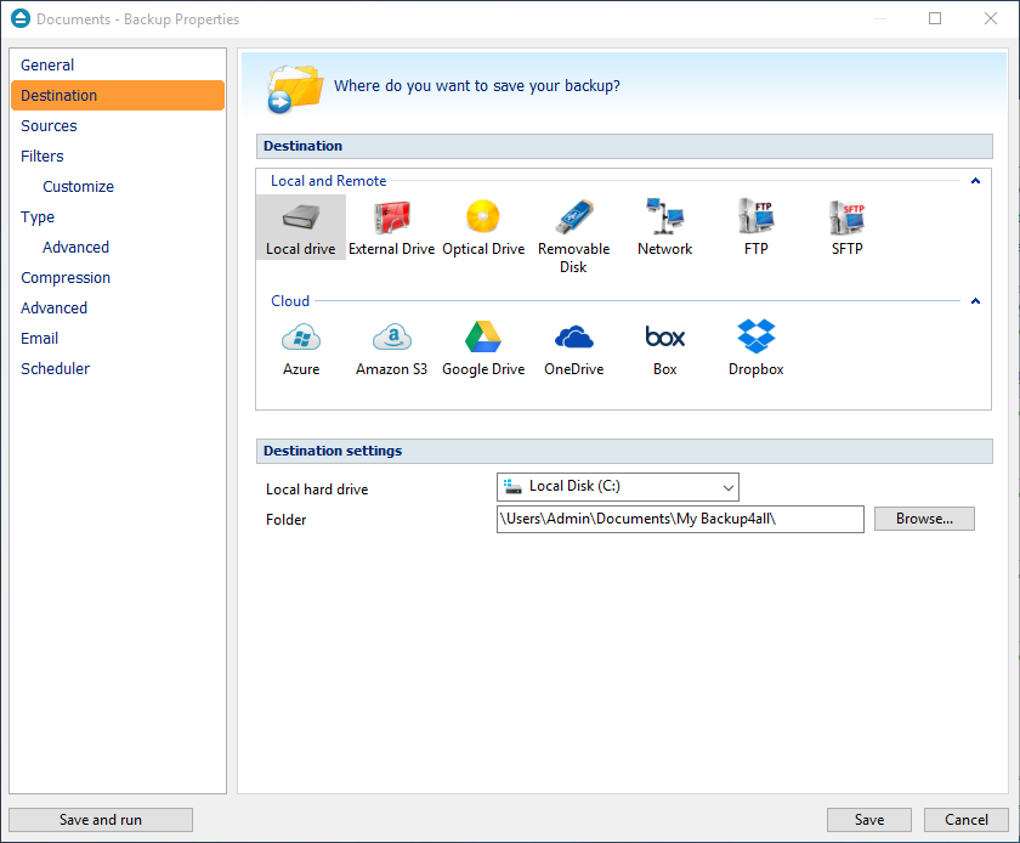
- Multiple Destination Support: Save copies to local drives, external USB devices, network shares, FTP/SFTP servers, or popular cloud services like Google Drive and Dropbox.
- Incremental & Differential Backups: Reduce storage consumption and speed up backup windows by only copying changed data after the initial full backup.
- Encryption & Compression: Protect sensitive information with AES‑256 encryption and compress backups to save space without sacrificing integrity.
- Notification System: Receive real‑time sound alerts, desktop pop‑ups, and customizable email reports for successful or failed backup jobs.
- Restoration Wizard: Browse backup sets visually, preview individual files, and restore with a single click—perfect for quick recovery.
- Built‑In Scheduler & Task Runner: Integrates with Windows Task Scheduler and macOS launch agents for background operation.
- Multi‑Language Interface: Available in English, Spanish, German, French, and more, making it accessible to a global audience.
These features collectively make Backup4all a powerful yet user‑friendly solution for anyone who needs reliable data protection. The combination of granular control and automation reduces the risk of human error while keeping the backup process transparent and easy to monitor. Whether you are dealing with a single workstation or a small network of machines, the software’s modular design lets you tailor the backup strategy to your exact requirements without paying for unnecessary extras.
Installation & First‑Run Walkthrough
Step‑by‑Step Installation
Downloading and installing Backup4all is straightforward. Visit the official website, click the Download button for the Windows or macOS installer, and run the executable. The installer guides you through the usual acceptance of the license agreement, selection of the installation folder (default is C:\Program Files\Backup4all on Windows), and optional creation of a desktop shortcut. After the files copy, the program launches automatically for the initial configuration.
Creating Your First Backup Profile
When Backup4all opens for the first time, you are greeted by a clean dashboard with a prominent “Create New Profile” button. Clicking it launches the built‑in wizard, which walks you through four essential steps:
- Select Source Files/Folders: Browse your file system and choose the directories you want to protect. You can add multiple locations, such as
C:\DocumentsandD:\Projects. - Choose Destination: Pick a local drive, external USB stick, network share, or configure cloud credentials for services like Google Drive.
- Set Schedule & Filters: Define when the backup runs (e.g., every day at 02:00 AM) and apply filters to exclude temporary files or limit backups to files larger than 1 MB.
- Configure Notifications: Enable sound alerts, desktop pop‑ups, and email reports. Enter your SMTP details if you want email notifications.
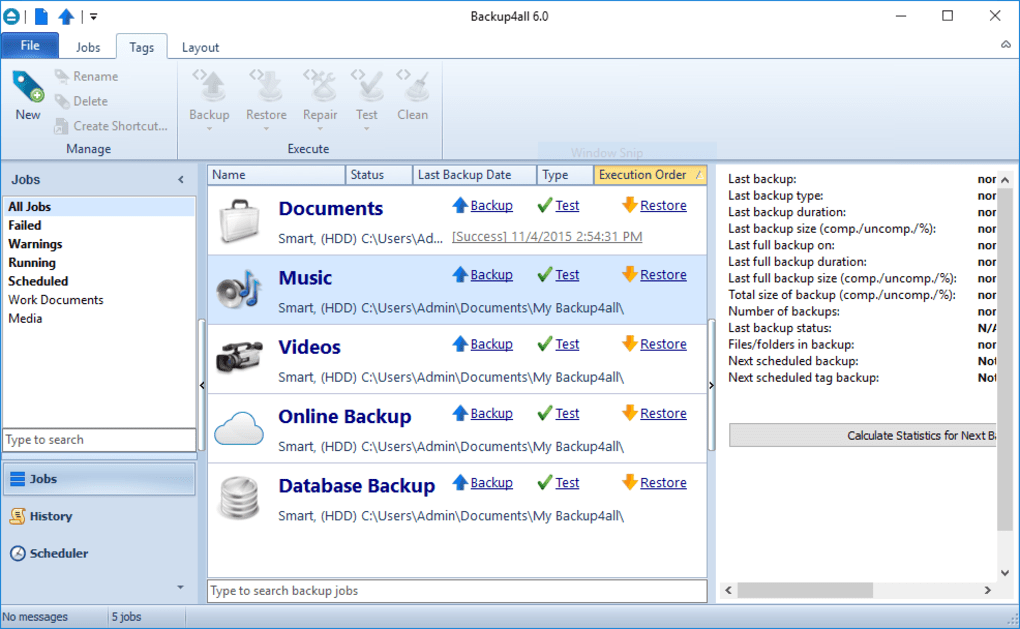
After completing the wizard, the profile appears in the main window with a customizable icon and brief description. You can edit any setting later by right‑clicking the profile and selecting “Properties.”
Running & Monitoring Backups
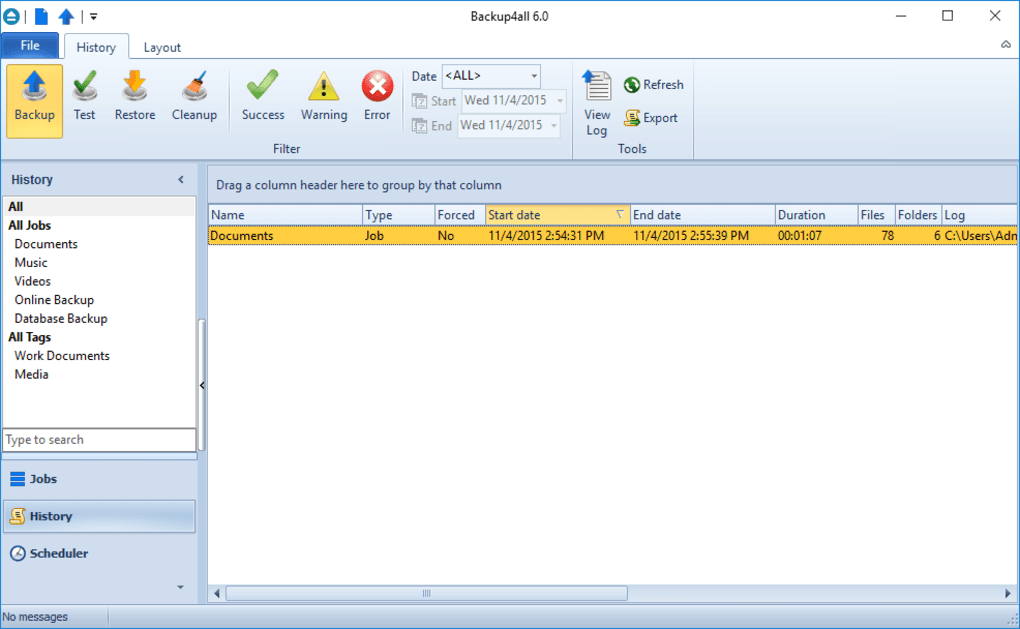
Once a profile is active, Backup4all runs automatically according to the schedule you set. The Job History tab logs each execution, showing start time, duration, number of files processed, and any errors encountered. For manual runs, simply select the profile and click the Run Now button. The real‑time progress bar provides visual feedback, and upon completion you’ll hear the confirmation sound you configured earlier. If an error occurs—such as a missing destination drive—Backup4all sends an email alert (if enabled) and logs a detailed message to help you troubleshoot.
Overall, the installation and first‑run experience balances simplicity for beginners with depth for power users who need precise control over their backup strategy.
System Compatibility, Pros & Cons
Supported Operating Systems
Backup4all runs natively on Windows 7, 8, 10, and 11 (both 32‑bit and 64‑bit) and on macOS 10.13 (High Sierra) through 13 (Ventura). While there is no official Linux client, the Windows version can be executed under Wine with full functionality for users who prefer a Linux environment.
Performance & Resource Usage
The application is optimized to run in the background with minimal CPU and memory footprint. Incremental backups typically consume less than 5 % of CPU and under 100 MB of RAM on a standard workstation, ensuring that your primary tasks remain unaffected. Compression and encryption processes are multi‑threaded, taking advantage of modern multi‑core CPUs to accelerate large data transfers without noticeable lag.
Pros
- Highly customizable backup profiles for diverse needs.
- Supports a wide range of destinations, including cloud services.
- Robust encryption (AES‑256) and compression options protect data integrity.
- Detailed scheduling and filtering give precise control over what gets backed up.
- Comprehensive notification system keeps you informed of every backup event.
- Intuitive restoration wizard simplifies the recovery process.
- Multi‑language UI broadens accessibility.
Cons
- Initial learning curve can be steep for users unfamiliar with backup concepts.
- The setup wizard does not launch automatically on first run, requiring a manual start.
- Advanced features (e.g., cloud integration) are only available in the paid version.
- No native Linux client; reliance on Wine may be a barrier for some.
- Interface, while functional, looks slightly dated compared to newer competitors.
Despite these minor drawbacks, the overall value proposition of Backup4all remains strong, especially for users who need a reliable, feature‑rich backup solution without sacrificing flexibility.
Frequently Asked Questions
Can Backup4all back up to cloud storage services?
Yes. The paid edition includes built‑in connectors for Google Drive, Dropbox, OneDrive, and Amazon S3. You can configure your cloud credentials in the destination settings and schedule cloud‑based backups just like local ones.
Is the backup data encrypted?
Backup4all offers AES‑256 encryption for all backup sets. Encryption can be enabled per profile, ensuring that sensitive files remain protected both at rest and during transfer to remote destinations.
How does incremental backup work?
After the initial full backup, Backup4all tracks changes to files using timestamps and file hashes. During subsequent runs, only files that have been added, modified, or deleted are processed, which dramatically reduces backup time and storage consumption.
Can I restore individual files without restoring the whole backup set?
Absolutely. The restoration wizard lets you browse the contents of any backup set, preview files, and select individual items for recovery. This feature is handy when you only need a single document or photo.
Is there a free version of Backup4all?
A limited free trial is available, allowing you to evaluate all core features for 30 days. After the trial, a one‑time purchase unlocks the full feature set, including cloud integration and advanced scheduling.
Conclusion & Call to Action
Backup4all delivers a comprehensive, secure, and highly customizable backup experience that caters to both casual users and professionals. While the initial setup may require a few minutes of learning, the payoff is a set‑and‑forget system that safeguards your data against hardware failures, accidental deletions, and ransomware attacks. Its robust feature set—including encrypted incremental backups, multi‑destination support, and real‑time notifications—makes it a standout choice in a crowded market. If you’re ready to protect your files with a reliable, feature‑rich solution, download Backup4all today and start building your personalized backup strategy. Remember, the cost of losing critical data far outweighs the modest investment in a solid backup solution.
Backup4all strikes a good balance between power and usability. The extensive profiling options and encryption features make it suitable for business environments, while the intuitive UI keeps it accessible for home users. Minor UI quirks and the lack of a native Linux client are the only real drawbacks, but they do not outweigh the overall reliability and flexibility the software provides.







